Fable is an iOS app designed to help you digest written content by turning articles and documents into podcasts.
The Idea
The idea behind Fable was simple: make it easier for people who don’t have time to read, to still consume the content they care about.
But rather than building a standard text-to-speech tool, we made a deliberate choice to go with a podcast format — two AI hosts discussing the content rather than a single voice reading it word for word. The reasoning was that a conversation, even a generated one, carries more character and perspective. A dialogue can surface different angles of a topic in a way that a flat narration rarely does. We believed that made the content more engaging and easier to retain.
The target audience was busy people — commuters, professionals, anyone with a backlog of articles and not enough hours in the day.
Overview
Fable is built across three layers. The frontend is a React Native and Expo iOS app — minimal by design, with three tabs, a player, and a create screen. The backend is an asynchronous Go pipeline that takes a document or URL, runs it through Google Gemini to produce a structured two-host dialogue script, then synthesises and stitches the audio using either ElevenLabs or Google TTS depending on the user’s tier. Between those two layers sits a Redis queue managed by Asynq, keeping generation work off the request path so the app stays responsive while jobs run in the background.
This article walks through each layer in detail — the iOS-specific gotchas, the frontend stack decisions, the voice pipeline engineering, and the product and distribution lessons we picked up along the way.
Product Design & UX
Fable was designed with a single guiding principle: get out of the way. The app does one thing — turns documents and articles into audio — and every design decision was made in service of that. No dashboards, no settings sprawl, no onboarding flows. Three tabs, a player, and a create screen.
The UI is deliberately minimal: lowercase headings, generous whitespace, a muted colour palette, and dark mode support that follows system preferences. It reads more like a reading app than a productivity tool, which felt appropriate given what it was trying to replace.
The App at a Glance
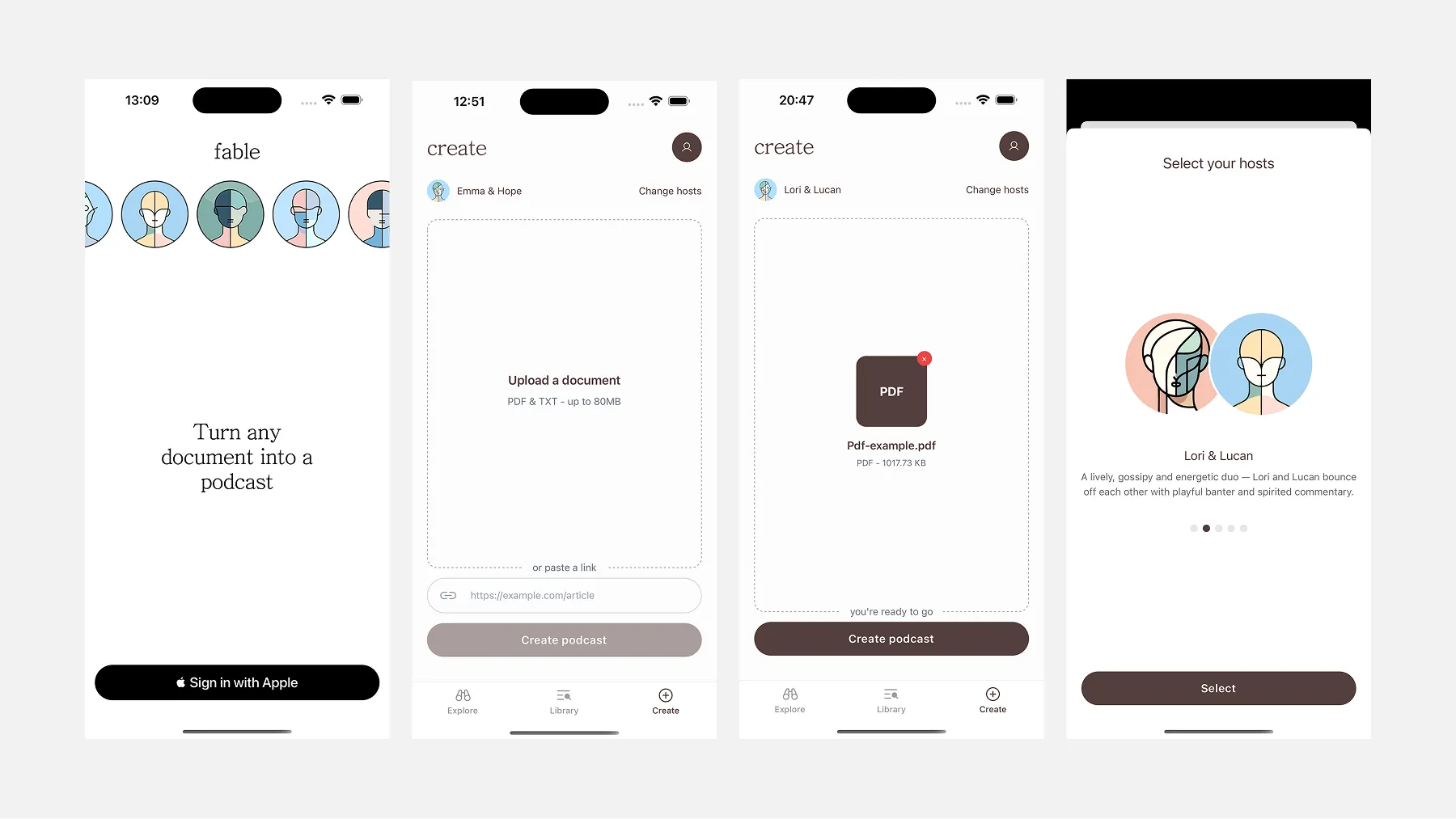
Sign in is a single screen — Sign in with Apple. No email, no password, no form to fill out.
Explore is a curated feed of pre-generated podcasts. It serves two purposes: it gives new users something to listen to before they’ve created anything, and it demonstrates what Fable actually sounds like before committing to generating their own.
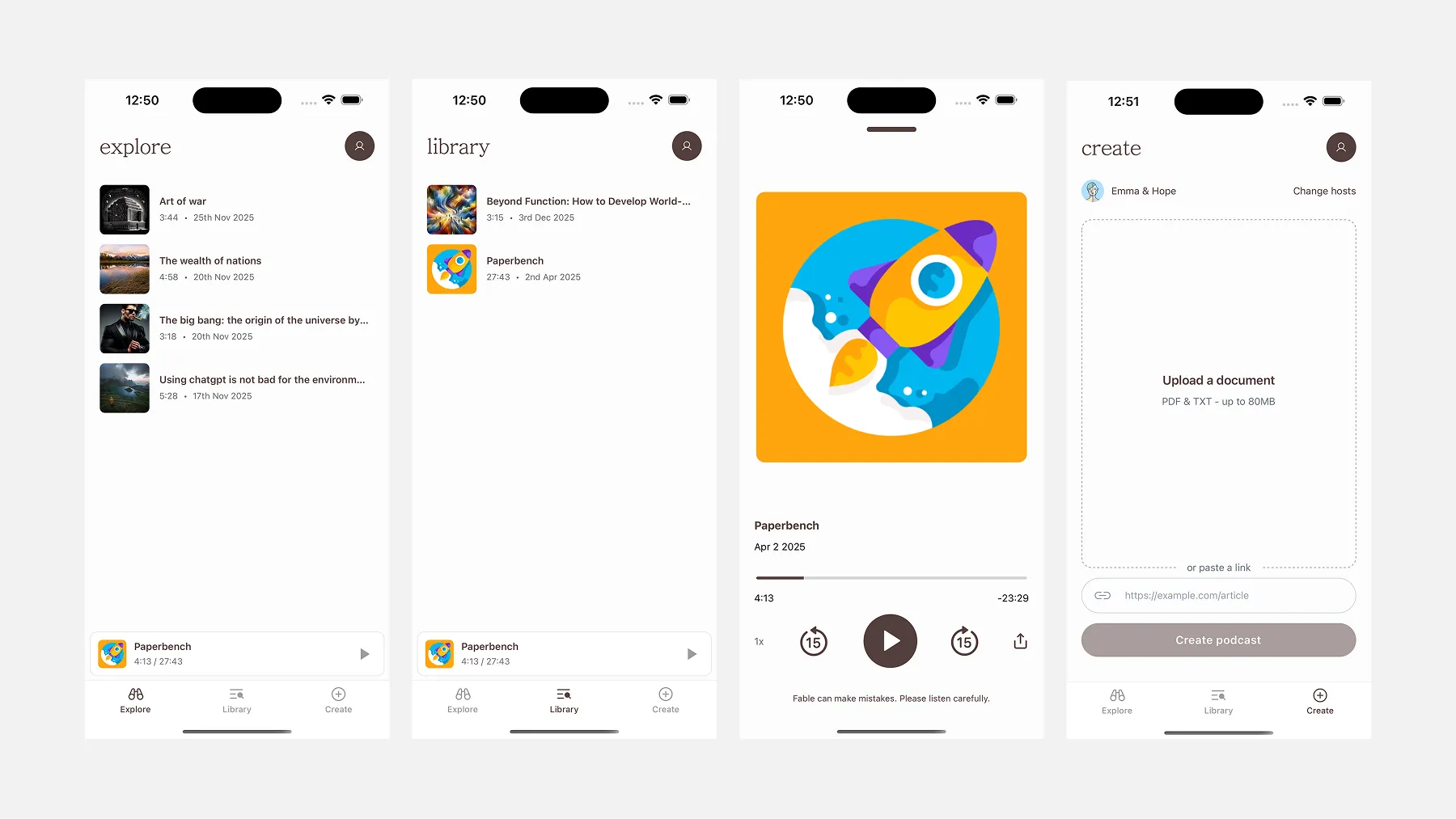
Library is your personal feed — everything you’ve generated, listed chronologically with duration and date. Tap any item to open the full player. A persistent mini-player sits at the bottom while audio is playing, so you can browse without losing your place.
Create is where content goes in. Upload a PDF or TXT file (up to 80MB), or paste a URL. That’s the entire input surface. Hit “Create podcast” and the job is queued — you’ll get a push notification when it’s ready.
The player is full-screen: cover art, title, a scrubber, playback speed (1x to 2x), skip 15 seconds in either direction, and a share button. At the bottom, a Summary button opens a bottom sheet with a brief text summary of the source content — generated server-side alongside the audio. A small disclaimer sits beneath the controls: “Fable can make mistakes. Please listen carefully.”
Settings lives behind the profile icon and keeps it simple: audio time consumed, number of podcasts generated, theme toggle (Light / System / Dark), and account management. One purchase button: 100 minutes for $5.99.
Cover Art
Each podcast in Fable has a cover image. In earlier versions, these were a fixed set of stock images pulled from the web — fine for a prototype, but not scalable and not particularly meaningful.
The current approach generates abstract cover art automatically using a server-side script. Each image is a unique pattern of shapes and colours derived procedurally, giving every podcast a distinct identity without requiring any manual curation. It’s a small detail, but it makes the library feel alive rather than repetitive.
UX Decisions We Reversed
Two features didn’t survive contact with reality.
The host picker. Early versions of the Create screen let users choose which AI hosts would narrate their podcast — a carousel of voice pairings, each with a name and personality description (“Lori & Lucan — a lively, gossipy duo with playful banter”). It was a nice idea. In practice, it added a decision point to a flow that should have been as frictionless as possible. Users didn’t have enough context to make a meaningful choice, and the extra step created hesitation where there shouldn’t have been any. We removed it. The backend now selects the most appropriate voices automatically.
The length selector. At one point users could choose how long they wanted their podcast to be. Again, sounds like a useful control. In practice, most users had no strong preference, and those who did couldn’t predict how their document would translate to audio time anyway. The backend now determines length based on the source content. One less thing to think about.
Both removals point to the same lesson: in an app where the core value is saving the user effort, every extra choice is a small tax. The goal is to make the output feel like it arrived — not like the user built it.
The Share Extension Flow
One UX surface worth calling out separately is the Share Extension — the feature that lets Fable appear in iOS’s native share sheet when you share a document from Files or another app.
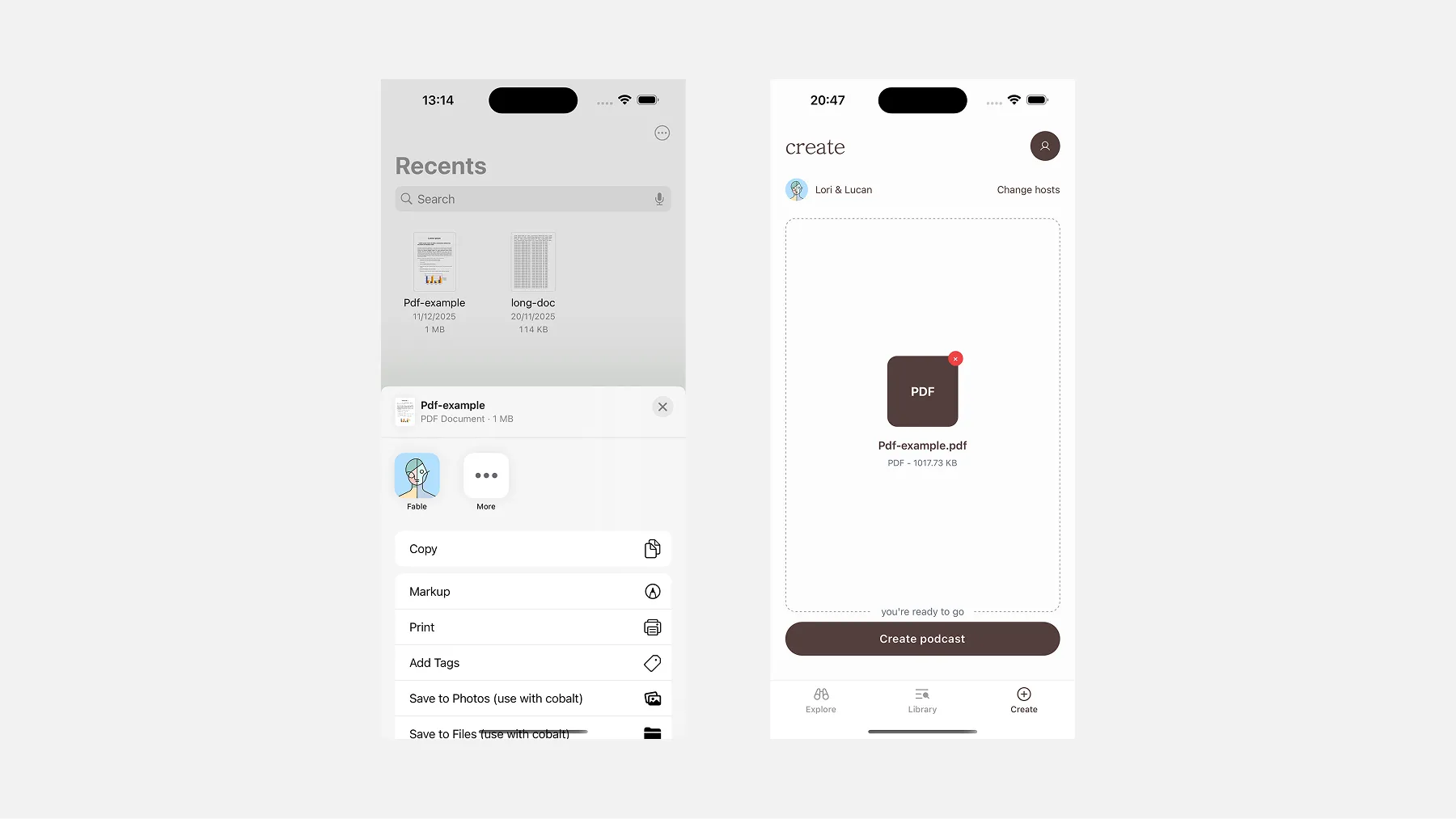
Tap Fable from the share sheet, and the document lands directly on the Create screen, ready to go. No copy-pasting, no switching context. It’s the most frictionless path from finding content to generating a podcast, and one of the more technically involved features to build — covered in detail in the Frontend Stack section below.
Building the iOS App
Getting an app onto the App Store starts before you write a single line of code. You need an Apple Developer account (~$99/year), and with it comes a setup process most web developers haven’t encountered: provisioning profiles, bundle identifiers, signing certificates. Expo abstracts most of this, including auto-submitting builds via EAS, which saved us significant time.
Where native complexity crept back in was features that required stepping outside Expo’s managed workflow — specifically the Share Extension. That feature required a native Swift target, App Groups configuration in Xcode, and an additional entitlements approval from Apple. More on that in the Tech Stack section.
The Backend Architecture
Fable’s generation pipeline is fully asynchronous. When a user submits a document, the GraphQL API accepts the request, creates a database record, and immediately enqueues a job. The actual work happens in the background across three discrete worker stages, each handing off to the next via a Redis queue managed by Asynq.
The API itself exposes three entry points depending on how the content arrives:
extend type Mutation {
  createPodcastFromFile(
    input: CreatePodcastFromFileInput!,
    config: ConfigInput
  ): Podcast!

  createPodcastFromWebContent(
    input: CreatePodcastFromWebContentInput!,
    config: ConfigInput
  ): Podcast!

  createPodcastFromRawText(
    input: CreatePodcastFromRawTextInput!,
    config: ConfigInput
  ): Podcast!
}
This separation was deliberate. Generation, especially with LLM calls and TTS synthesis, can take anywhere from thirty seconds to several minutes depending on document length and which TTS provider is active. Keeping that work off the request path meant the API could respond instantly, and the app could poll for status rather than holding a connection open.
The three stages are:
- Prep Notes: the source material is analysed and summarised
- Dialogue Scripting: the summary is transformed into a two-host script
- Audio Synthesis: the script is converted to audio and assembled
Each stage is a separate Go worker process pulling from Redis. If a stage fails, Asynq handles retries with exponential backoff. State between stages is persisted in Postgres, so a retry picks up from a clean checkpoint rather than re-running the entire pipeline.
Stage 1: Prep Notes with Gemini
The first worker takes the raw source material, a PDF, web content, or plain text, and passes it to Google Gemini with a structured prompt. The output is a set of “Prep Notes”: a summary, a list of key themes, and host-specific instructions that shape how the dialogue will feel.
Rather than asking Gemini to return free-form text, we used a typed JSON response schema so the output was always structured and predictable:
genModel.GenerationConfig = genai.GenerationConfig{
    ResponseMIMEType: "application/json",
    ResponseSchema: &genai.Schema{
        Type: genai.TypeObject,
        Properties: map[string]*genai.Schema{
            "analysis": {
                Type: genai.TypeObject,
                Properties: map[string]*genai.Schema{
                    "title":   {Type: genai.TypeString},
                    "summary": {Type: genai.TypeString},
                    "vibe":    {Type: genai.TypeString},
                },
            },
            "key_elements": {
                Type: genai.TypeArray,
                Items: &genai.Schema{Type: genai.TypeString},
            },
        },
    },
}
The vibe field in particular told the dialogue stage what the emotional register of the episode should be, which influenced everything from word choice to pacing.
For longer documents, the prep notes worker runs in long-form mode, chunking the source material into sections and processing each one independently before merging the results. This was necessary partly because of context window limits, but also because it produced better summaries. The model stayed focused on each section rather than compressing an entire document into vague generalities.
Stage 2: Dialogue Scripting
The second worker takes the prep notes and generates a full dialogue script as structured JSON, with each turn tagged with the speaker, the line, and any pacing metadata. We chose JSON rather than plain text because it made downstream processing deterministic: no regex parsing of speaker labels, no ambiguity about where one turn ends and the next begins.
The dialogue prompt was one of the most iterated pieces of the system. Early outputs sounded like what they were: a model trying to sound like two people talking. The problem wasn’t vocabulary but the rhythm. Real conversations have interruptions, incomplete sentences, moments where one host picks up mid-thought from the other. Getting that from a model required being very explicit in the prompt about what “natural” actually means at a structural level.
Filter cleanup
Even with a well-tuned prompt, the model reliably produced a set of phrases that made the output feel synthetic. such as:
- “That’s a great point…”
- “Absolutely, and to build on that…”
- “Fascinating. So what you’re saying is…”
These are the conversational tics that LLMs reach for when they need to transition between speakers. They sound reasonable in isolation, but after ten consecutive turns of affirmation, the dialogue starts to feel like a corporate training video.
The cleanup pass runs after dialogue generation and works in two layers. The first is a regex pass against a maintained list of known filler patterns, which was fast, deterministic, and cheap.
func (s *service) CleanupDialogue(ctx context.Context, dialogue []types.DialogueContent) []types.DialogueContent {
    bracketRe := regexp.MustCompile(`\[.*?\]`)

    for i, line := range dialogue {
        content := line.Content
        content = bracketRe.ReplaceAllString(content, "")

        spaceRe := regexp.MustCompile(`\s+`)
        content = spaceRe.ReplaceAllString(content, " ")

        dialogue[i].Content = strings.TrimSpace(content)
    }
    return dialogue
}
Second, a lightweight Gemini call reviews the cleaned script and flags any remaining phrases that still read as synthetic — things that don’t pattern-match but feel off. The regex handles known patterns reliably; the model pass catches the rest. Together they caught most of what made it through the prompt constraints.
Stage 3: Audio Synthesis
The final worker takes the cleaned dialogue JSON and converts it to audio. This is where the two TTS providers come in, and where most of the subtle engineering work lives.
ElevenLabs vs Google TTS:
We supported two TTS backends: ElevenLabs for premium tiers and Google TTS (Neural2) for standard. The quality difference between them is meaningful enough to affect how you architect the audio generation layer.
Google Neural2 produces clean, intelligible speech and is significantly cheaper at scale. The voices are good, but the prosody is consistent to a fault. Every sentence lands with roughly the same emotional weight, which works fine for narration but flattens the conversational feel we were trying to create.
ElevenLabs costs more per character, but what you get in return is a much wider dynamic range. The voices have natural variation in pace, pitch, and emphasis that the Google voices don’t have. More importantly, ElevenLabs exposes SSML-style prosody controls that Google’s API doesn’t offer at the same level of granularity.
The cost difference is real. For a typical ten-minute episode, ElevenLabs runs roughly 4–5x the cost of Google Neural2. For an indie product, the cost adds up.
Prosody and Emphasis:
The prosody layer was one of the more interesting parts of the voice pipeline to build. Both providers accept some form of markup to control delivery, but ElevenLabs gives you significantly more to work with.
With Google TTS, you get basic SSML: <break> tags to insert pauses, <emphasis> tags for stress, <prosody rate> and <prosody pitch> for broad adjustments. It works, but the controls are blunt. Changing the pitch on a sentence-level element affects the entire sentence uniformly and there’s no way to tell the model to stress a particular word within a naturally flowing delivery.
ElevenLabs surfaces more granular controls. The <emphasis> tag behaves more like you would expect, applying stress at the word level without flattening the surrounding speech. You can also control pace within a turn in ways that Google doesn’t expose cleanly, which matters a lot for scripted dialogue where two hosts have distinct speaking styles.
In practice, the dialogue JSON included a field for prosody hints, with annotations generated during the scripting stage that got translated into provider-specific markup before the TTS call. For ElevenLabs, this meant injecting <emphasis> tags and strategic <break> elements. For Google, it meant using <prosody> attributes more conservatively, since over-annotating Google’s SSML tended to produce robotic-sounding output.
Pacing Logic:
Pacing was the piece we spent the most time on. A dialogue that sounds natural in text sounds mechanical if you just concatenate the audio clips sequentially. Spoken conversation has micro-pauses, turn-taking breath gaps, and longer pauses between topic shifts that don’t exist in the raw TTS output.
The pacing logic in the service layer analyses the dialogue JSON before synthesis and calculates a silence duration for each speaker transition. The rules are roughly:
- Same speaker, continuation: no added pause
- Speaker switch, same topic: short pause (150–250ms), injected via a
<break>tag in the TTS markup where supported, or an ffmpeg-generated silence clip where it isn’t - Speaker switch, topic shift: longer pause (400–600ms), always generated as an ffmpeg silence clip and stitched in post-synthesis
- Episode transitions: full beats of silence (800ms+), generated independently and inserted at marked points in the script
The distinction between <break> tags and ffmpeg-generated silence matters. <break> hints are passed to the TTS provider and get synthesised into the audio clip itself. The model handles the pause natively, which produces a more natural result because the surrounding speech slightly anticipates it. ffmpeg silence is a hard splice: precise and predictable, but slightly more noticeable at the joint. We used <break> tags wherever the provider supported them reliably (ElevenLabs, primarily), and fell back to ffmpeg for Google TTS and for longer pauses where provider behaviour was inconsistent.
Audio clips are generated section by section and uploaded incrementally to Cloudflare R2. This meant that for longer episodes, the first few minutes were available for playback before the rest of the episode had finished generating. This was a meaningful UX improvement over waiting for the full file.
Incremental Upload:
Audio clips are generated section by section and uploaded incrementally to Cloudflare R2, rather than waiting for the full episode to assemble:
for dialogueNumber, dialogue := range payload.Dialogues {
    podcastBytes, _, _, err := t.service.GeneratePodcast(ctx, voiceConfig, dialogue, RETRY_INTERVAL)

    isFinalPart := dialogueNumber == len(payload.Dialogues)-1
    err = t.service.UploadPodcastBytesToR2(ctx, filename, payload.PodcastID, dialogueNumber, isFinalPart, podcastBytes)
}

return t.service.UpdatePodcastByID(ctx, payload.PodcastID, &models.Podcast{Status: models.PodcastStatusComplete})
For longer episodes, this meant the first few minutes were available for playback before the rest had finished generating. This created a better user experience over waiting for the completed file.
The Frontend Stack
Fable is a React Native and Expo application, built iOS-first. The team came from a web background, so React Native was the natural choice — but more specifically, we leaned into Expo’s managed workflow rather than going bare React Native from the start. The tradeoff was worth it: managed Expo gave us fast iteration cycles and over-the-air updates via EAS, meaning we could push fixes without going through App Store review every time.
Routing was handled with Expo Router, which brings file-based routing to mobile the same way Next.js does for the web — immediately familiar and easy to keep organised as the app grew.
Styling was handled with NativeWind — essentially Tailwind CSS for React Native.
State management was split by concern. We used Zustand for global state — auth and the audio player — partly because of its simple API and partly because of its clean persistence story. Auth tokens are stored securely in expo-secure-store with Face ID support. Player state persists to AsyncStorage so playback position survives app restarts.
For data fetching, the backend exposed a GraphQL API, so we reached for Apollo Client.
Audio playback was one of the more interesting technical decisions. We used react-native-audio-api, which mirrors the Web Audio API. This gave us fine-grained control over decoding and playback — background audio, lock screen controls, and variable playback speed (1x to 2x) all came together through this. The lock screen and Control Center integration required its own manager to wire up play, pause, seek, and skip controls.
For payments, we used RevenueCat to manage in-app purchases and subscriptions. StoreKit — Apple’s native purchase framework — is notoriously complex to work with directly, and RevenueCat abstracts most of that pain. It also handles receipt validation and gives you a dashboard to monitor subscription state without building any of that infrastructure yourself.
On the DevOps side, EAS Build handled our build pipeline with separate profiles for development, internal preview, and production. Sentry covered error tracking in production, giving us breadcrumbs and context when things broke in the wild rather than just a stack trace.
The share Extension
The one place we had to fully step outside Expo’s managed world was the Share Extension — the feature that lets users share a document or URL from any app directly into Fable. Expo has no plugin for this.
It required a native Swift target, App Groups configuration in Xcode, and Apple entitlements approval. The mental model that unlocks everything: a share extension isn’t just a button you toggle on — it’s a small, separate app that runs inside the share sheet. It has its own lifecycle, its own permissions, and very limited access to your main app.
Because the extension can’t directly talk to the main app, you need a shared space that both can read from and write to. Apple calls this App Groups — essentially a shared storage bucket. The extension drops the file in; the main app picks it up.
The complete flow once everything is wired up:
- The user shares a file to Fable from any app
- The share extension copies the file into the App Group container
- The extension opens the main app via a deep link
- The main app reads the shared file on launch and routes the user to the Create page
It works cleanly once configured. Getting there the first time is not straightforward — Apple’s documentation assumes existing Xcode familiarity, and there are very few resources that explain it end-to-end for React Native.
Distribution & Discoverability
The App Store is its own ecosystem with its own search ranking logic, and it caught us off guard.
Fable launched simply as “Fable” — competing with hundreds of other apps sharing the same name across books, stories, and audio categories. App Store search ranking factors the app name heavily, and a generic name in a crowded category is a significant disadvantage from day one.
Renaming the app to Fable: Documents to Podcast improved our discoverability noticeably. It was a lesson we learned later than we should have — app naming and ASO (App Store Optimization) needs to be part of the conversation before you ship, not after you’ve been struggling to rank for months.
Closing
If you’ve got a backlog of articles or documents you’ve been meaning to read, Fable might be for you. Turn any PDF, URL, or text into a podcast in minutes. Give it a go at fablepod.com.
Credits
Fable started with an idea from Timi Ajiboye, and was directed by Opemipo Aikomo.
Brought to life by: